
Ember 1.1: Your FrankenPHP Dashboard Just Got Smarter
Published on 14 April 2026
When I released Ember 1.0, the mission was clear: give Caddy and FrankenPHP users real-time, zero-config monitoring straight from the terminal. The response from the community has been amazing so far (with the first issues and PRs submitted), and it pushed me to go further.
Today, I’m happy to announce Ember 1.1, packed with features that turn Ember from a monitoring tool into a true control panel for your Caddy infrastructure.
Browse Your Caddy Configuration Without Leaving the Terminal
We’ve all been there: you’re monitoring your server, something looks off, and you need to check the Caddy configuration. Until now, that meant opening another terminal, curling the admin API, and scrolling through a wall of JSON.
Not anymore. Ember 1.1 introduces a brand new Config tab that pulls your full Caddy configuration straight from the admin API and displays it as a navigable, syntax-highlighted tree. Everything is expanded by default, so you can immediately see what’s going on. Search with /, go through all occurrences by tapping n. No more context-switching, no more piping JSON through jq: your config lives right next to your metrics.
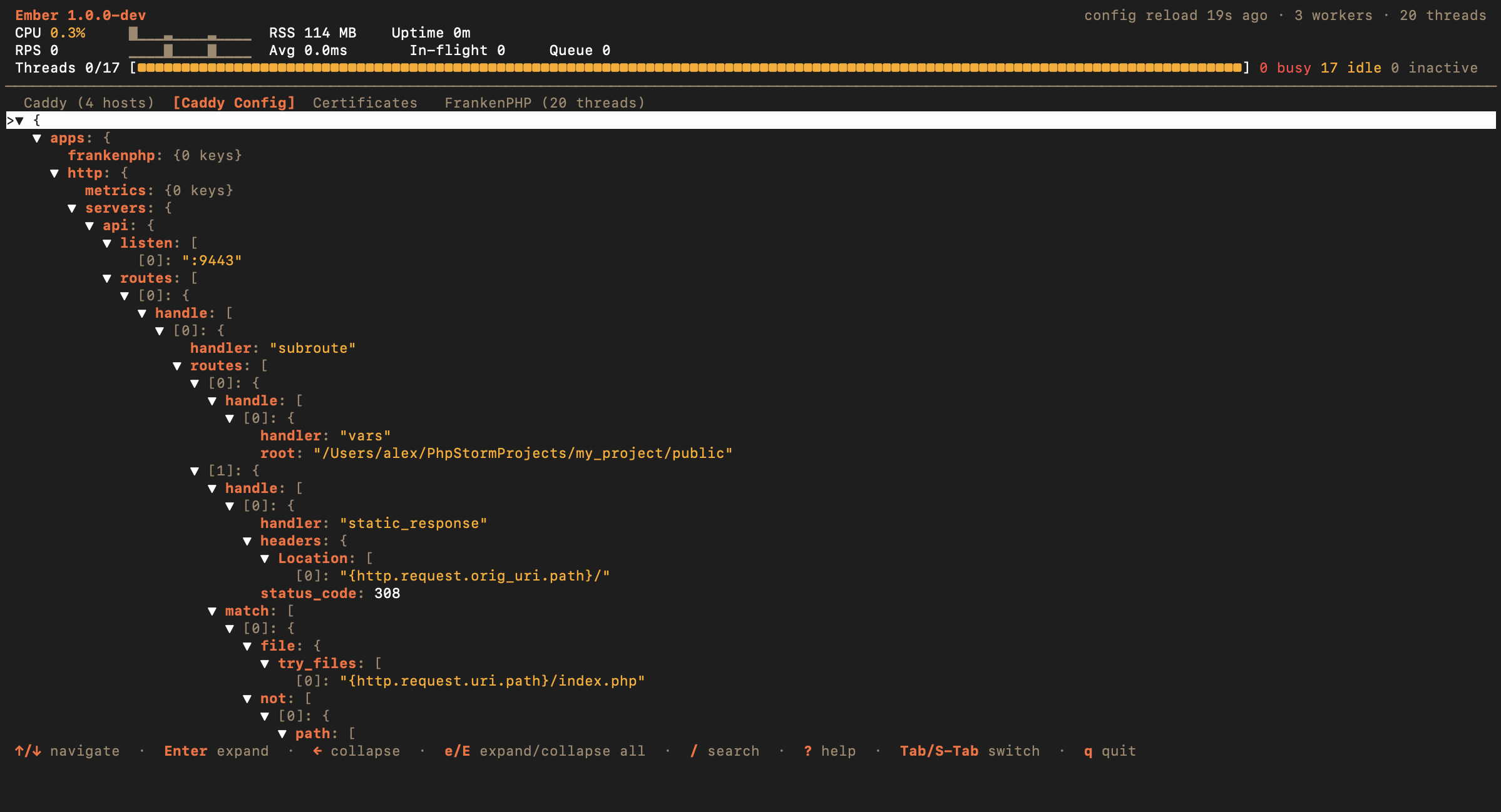
And because things change in production, the dashboard now shows a config reload status badge in real time. You’ll know instantly whether the last reload succeeded or failed, without digging through logs. This status is also exported as Prometheus metrics, so your alerting pipeline can pick it up too.
Keep an Eye on Your TLS Certificates
TLS is the backbone of any production setup, and expired certificates are a classic source of outages. Ember 1.1 adds a dedicated Certificates tab that gives you a clear overview of all TLS certificates managed by Caddy’s internal PKI.
For each certificate, you’ll see:
- Subject and issuer
- DNS names covered
- Validity period (with visual indicators for soon-to-expire certificates)
- Whether it’s a CA certificate
- Auto-renewal status
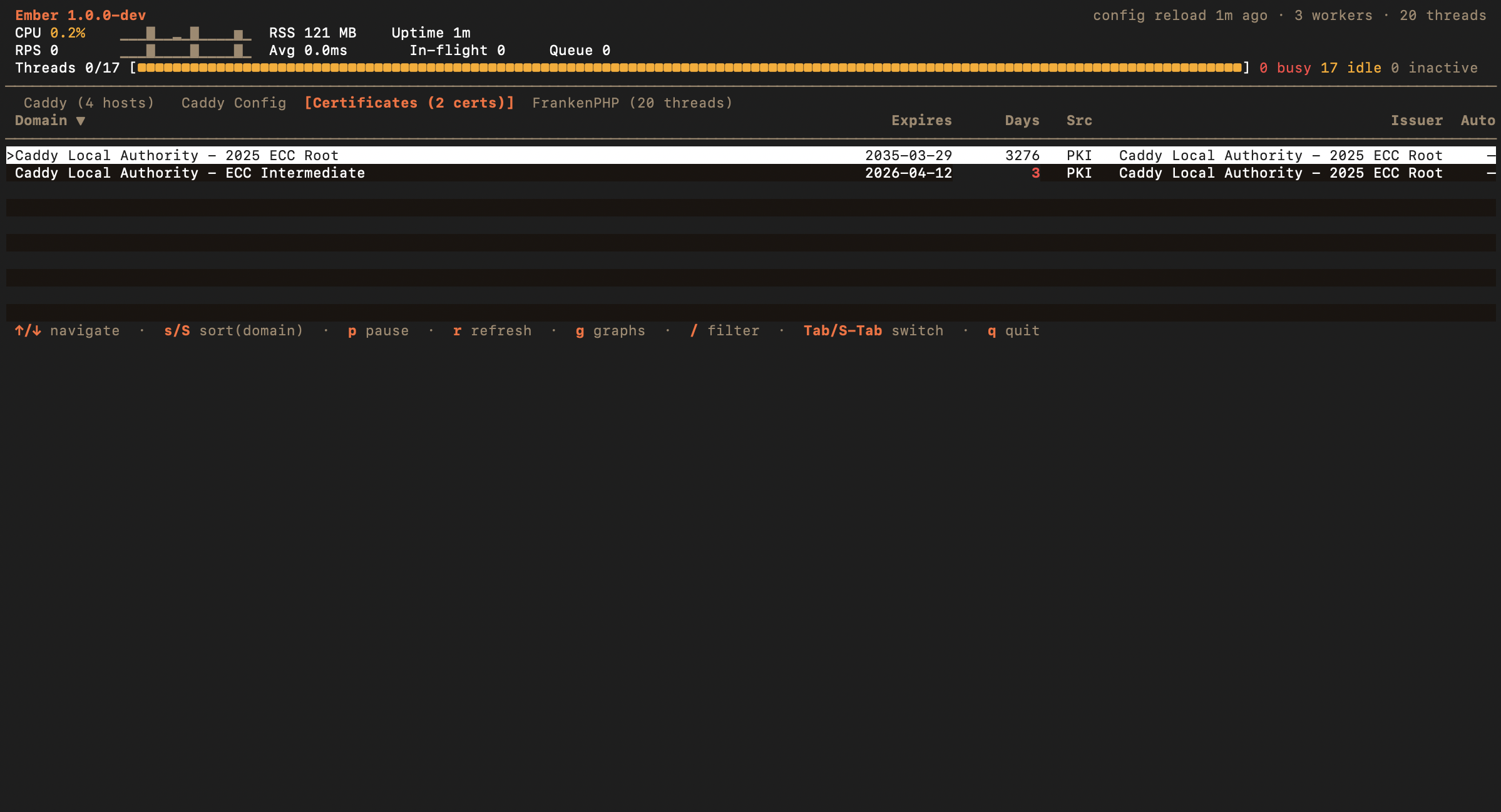
Ember discovers Caddy’s Certificate Authorities automatically and fetches both root and intermediate certificates, as well as the leaf certificates served by your hosts. No configuration needed: if Caddy manages it, Ember shows it.
Visualize Request Timing with Waterfall Graphs
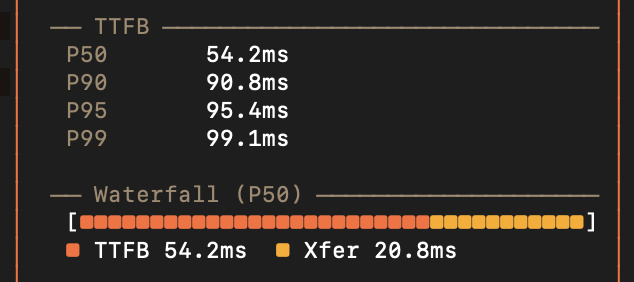
Understanding where time is spent in a request is key to diagnosing performance issues. The host detail panel now includes a waterfall graph that breaks down the median request time (P50) into two distinct phases:
- TTFB (Time-to-First-Byte): how long it takes before the first byte of the response is sent
- Xfer (Transfer): the time spent sending the rest of the response
This visual breakdown makes it immediately obvious whether a slowdown is caused by backend processing or by transfer overhead. The bars scale proportionally, so you can compare hosts at a glance.
Connect Through Unix Sockets
Many production setups expose Caddy’s admin API exclusively through a Unix socket for security reasons: no TCP port, no attack surface. Ember 1.1 now natively supports this with the unix// address scheme:
ember --addr unix//run/caddy/admin.sockThis works everywhere: interactive TUI, JSON streaming, daemon mode. TLS options are automatically disabled for Unix socket connections, since the transport is already secured by filesystem permissions. Docker users can simply mount the socket into their container and connect from there.
One-Liner Installation
Getting started with Ember is now even easier. A single curl | sh command detects your OS and architecture, downloads the latest release, and installs the binary:
curl -fsSL https://raw.githubusercontent.com/alexandre-daubois/ember/main/install.sh | shIt supports Linux and macOS on both amd64 and arm64. The install directory can be customized via the EMBER_INSTALL_DIR environment variable.
Of course, Homebrew and go install remain fully supported:
brew install alexandre-daubois/tap/ember
# or
go install github.com/alexandre-daubois/ember/cmd/ember@latest
Still polishing!
Beyond the headline features, Ember 1.1 includes several improvements that make the day-to-day experience smoother:
- Updated dashboard bar style for a cleaner, more readable layout
- Fixed a panic that could occur in rare conditions during long-running sessions
- Fixed window resizing so the TUI adapts correctly when you resize your terminal
- Dependency updates across the board
Get Ember 1.1
brew upgrade ember
# or
go install github.com/alexandre-daubois/ember/cmd/ember@latest
# or
curl -fsSL https://raw.githubusercontent.com/alexandre-daubois/ember/main/install.sh | sh
The full source code and documentation are available on GitHub. If you find Ember useful, a star goes a long way. Found a bug or have an idea? Open an issue or submit a pull request: Ember is open source, MIT-licensed, and community contributions are always welcome.